
TCFoundry
Process, CI/CD pipeline and observability: the organisation and automation for controlled Teamcenter changes. A release process that holds up and a CI/CD pipeline for repeatable packaging and deployment. Less manual effort per release, clear environment definitions and documentation generated from maintained information.
Process, CI/CD pipeline and observability: the organisation and automation for controlled Teamcenter changes. A release process that holds up and a CI/CD pipeline for repeatable packaging and deployment. Less manual effort per release, clear environment definitions and documentation that comes from maintained information.

Why are Teamcenter changes so costly?
Deploying a Teamcenter change is rarely just moving a customisation from development into production. Someone has to package it, someone has to deploy it, and someone has to know which servers, services, Dispatcher components and environment-specific settings are involved. When this depends on individual knowledge and manual steps, every release becomes a coordination exercise, and every exercise costs time, money and patience.
The cost usually hides in places nobody measures: repeated packaging, hand-built deployments, fixes for differences between environments, rework after failed releases and documentation that is out of date the day it is written.
The cause is rarely a lack of skill. It is a lack of a defined process and repeatable automation. Automation alone does not help either: a pipeline on top of an unclear process only produces errors faster. That is why TCFoundry starts with the process and adds automation on top.

What TCFoundry is made of
Process and automation only create value together. We build on our experience from many Teamcenter projects and bring all three elements. TCFoundry covers the lifecycle of your customer-specific configuration and customisations. It does not cover Teamcenter upgrades.

Process
A release process that fits your organisation: environment strategy, controlled release path, selective approval of changes, traceability, roles and responsibilities, and the practical rules for working with the repositories. We enable your teams to work this way. This is the foundation, and the first thing we look at.

CI/CD pipeline
Repeatable build, packaging and deployment across environments, plus a dedicated infrastructure inventory and documentation generated from it. The pipeline is ready for test automation. We implement it and adapt it to your landscape.

Observability
Performance and operational data on a single dashboard, and automatic remediation of recoverable issues such as a crashed Dispatcher. We set it up for your landscape.
Process first: the foundation of every TCFoundry setup
A pipeline automates what it is given. If roles, environments and approvals are unclear, an automated pipeline simply produces unclear results faster. That is why the process is the most important part of TCFoundry. We have extensive experience in building a resilient organisation around the DevOps cycle with Teamcenter. This includes:
-
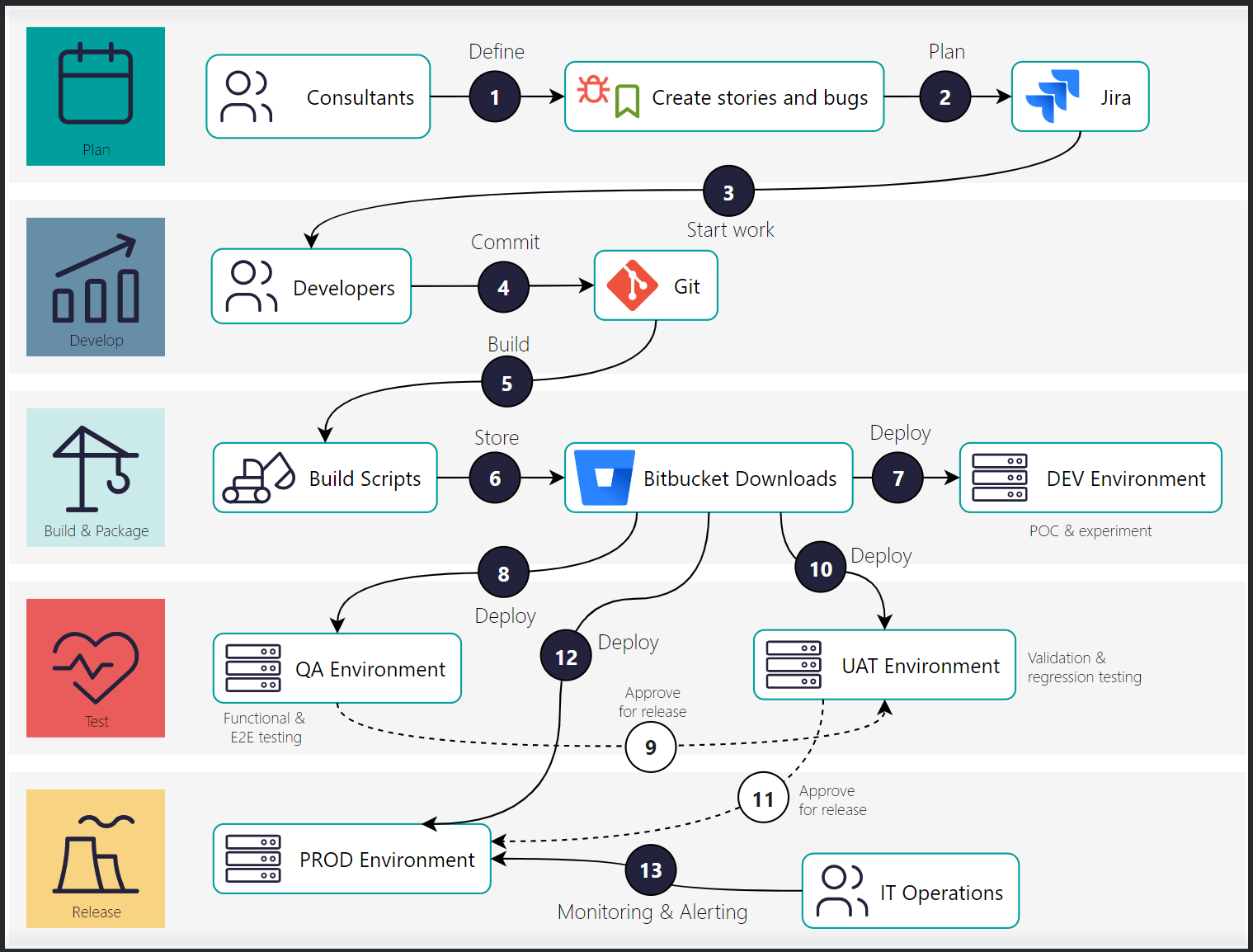
Release train: separate environments for experiments, continuous testing, release validation and production, each with defined stability and availability goals.
-
Selective release: individual changes are promoted to production independently, so maintenance changes and major project releases run in parallel.
-
Defined path for every change: from requirement to production, with clear responsibilities.
-
Traceability: every change is linked to a work item, and every delivered state is uniquely versioned and reproducible.
-
Roles and collaboration: defined responsibilities across business, development, test and IT operations.
-
Working with the repositories: clear conventions for what is managed where and how changes are prepared and handed over. We train your teams in them.
We do not copy this practice one to one. We adapt it to the size, maturity and regulatory context of your organisation.
Test automation: ready when you are
The CI/CD pipeline is ready for test automation. You decide how far to go.
-
Smoke tests after deployment: simple smoke tests run after every deployment, so a failed deployment is detected immediately.
-
Business use case test automation: full QA automation based on your business use cases. It needs an organisation around it (ownership, test data, maintenance), so we first justify it together with you.

Observability: see and fix what matters
Performance and operational data from your Teamcenter landscape come together on a single dashboard. Recoverable issues, such as a crashed Dispatcher, are remediated automatically, so teams can act on real problems instead of routine restarts.
Three ways to TCFoundry
Introducing TCFoundry either requires an already mature process, or we build one with you. After introduction, you can run it yourself, or we can take over.

You already have a mature process
Roles, environments, approvals and versioning are defined and lived. We introduce the CI/CD pipeline directly: workflows, inventory and documentation.

We build process and organisation with you
We analyse how you work today and recommend a fitting release and role model. We enable developers, administrators, key users and release managers, and then introduce the CI/CD pipeline.

We take over
We run the process, pipeline and landscape documentation as a managed service and aligns releases with your business teams.
Who is TCFoundry for?

CIOs and Heads of IT
A defined release process, repeatable delivery and a maintained backend inventory reduce dependence on individual knowledge.

PLM leaders and engineering IT
A consistent route from development to deployment supports release planning.

Teamcenter developers and administrators
Structured repositories and automation reduce repetitive packaging and deployment work.
How do you get started with TCFoundry?
We begin with three views of your current setup: how mature your release process, roles and collaboration are; how changes are prepared and deployed; and how backend environments are configured and documented. From this, we work out which of the three ways fits you.
If your process is mature, we adapt the CI/CD pipeline and set up the agreed infrastructure inventory. If the process is still being built, we start with advisory and enablement, and the pipeline follows afterwards.
Handover includes the implemented process, workflows and inventory responsibilities. If you prefer not to run it yourself, we can operate it as a managed service.


